What is DNS monitoring?
How DNS monitoring works
The Domain Name System translates names such as example.com into IP addresses and mail server names. A DNS monitor queries your records at regular intervals, checks that they resolve and compares the answers with the values you expect. If a record disappears, stops resolving or changes unexpectedly, you get an alert.
DNS problems are hard to spot from the inside. Resolvers cache answers for the length of each record's TTL, so a broken change can look fine on your own machine while visitors elsewhere already fail to reach you. Independent DNS monitoring shows you what the rest of the internet sees.
Without DNS monitoring
- Failures surface only when customers complain
- Unauthorised record changes can go unnoticed
- Email can stop arriving after an MX or SPF mistake
- Troubleshooting starts without a timeline of what changed
With DNS monitoring
- Alerts as soon as a record fails or changes
- A history of record values for faster root-cause analysis
- Early warning of hijacking or registrar problems
- More confidence during migrations and DNS provider changes
DNS record types to monitor
Each record type has a different job. Start with the ones your website and email depend on.
A records
Map a hostname to an IPv4 address. If an A record is wrong or missing, browsers cannot reach your website.
AAAA records
Map a hostname to an IPv6 address. A broken AAAA record can affect visitors on IPv6 networks even when IPv4 works.
CNAME records
Point one hostname to another, for example www to your CDN or hosting provider. Common for subdomains and third-party services.
MX records
List the mail servers that accept email for your domain. A mistake here can silently stop incoming email.
TXT records
Hold text values such as SPF, DKIM and DMARC policies and domain verification tokens. Errors hurt email deliverability.
NS records
Name the authoritative name servers for your domain. If NS records are wrong, every other record becomes unreachable.
SRV records
Advertise the host and port for specific services, such as SIP telephony or chat. Needed wherever clients discover services through DNS.
Benefits of DNS monitoring
Fast detection
Find out within minutes when a record stops resolving, instead of hearing about it from customers.
Faster troubleshooting
A history of record values shows exactly what changed and when, which shortens the path from alert to fix.
Change and hijack detection
Unexpected changes to A, NS or MX records can point to a compromised account, DNS hijacking or a mistake by a colleague or provider.
How to set up DNS monitoring
Step by step
- 1
Choose the records that matter
List the hostnames and record types your business depends on. Start with A and AAAA for your website, MX and TXT for email, and NS for the domain itself.
- 2
Note the expected values
Write down what each record should contain today, so you can spot unexpected changes as well as outright failures.
- 3
Pick a check interval
The interval sets how quickly you learn about a problem. Check critical records often and match the interval to how costly an outage would be.
- 4
Set up alerts and test them
Send alerts by email, Slack or webhook to the people who can act, then trigger a test to confirm they arrive.
DNS monitoring best practices
Monitor critical records first
Cover NS, A, AAAA and MX records before anything else, so the alerts that matter most are in place from day one.
Match intervals to impact
Check the records behind revenue and email most often; records for internal or rarely used services can be checked less frequently.
Keep alerts actionable
Route DNS alerts to the team that controls your DNS provider and registrar, with enough context to act without digging.
Keep a change history
A timeline of record values makes it easy to connect outages with deploys, migrations or provider changes.
Lower TTLs before planned changes
Reduce the TTL of a record at least one full TTL period before you change it, so mistakes can be corrected quickly. Restore it afterwards.
Protect your registrar account
Enable two-factor authentication and registrar lock, and watch your domain's renewal date. Some of the most serious DNS outages start at the registrar, not the DNS server.
Common DNS problems and how to fix them
DNS resolution failures
Problem: Lookups for your domain fail, so browsers show errors such as DNS_PROBE_FINISHED_NXDOMAIN.
Fix: Check that the NS records at your registrar match your DNS provider, that the record exists and that the zone has no errors. Query the authoritative servers directly with dig or nslookup.
Slow DNS resolution
Problem: Lookups take noticeably long, adding delay before the page even starts to load.
Fix: Check the health of your authoritative name servers, avoid long CNAME chains and consider a DNS provider with a global anycast network.
Unexpected DNS changes
Problem: Records change without a planned change, or point to an unknown IP address.
Fix: Review your DNS provider's audit log, rotate credentials, enable two-factor authentication and restore the correct values. Treat it as a potential security incident.
Changes that do not seem to apply
Problem: You updated a record, but some users still reach the old destination.
Fix: Resolvers cache records until their TTL expires. Confirm the new value on the authoritative servers, wait for the old TTL to pass and lower TTLs before future changes.
DNS monitoring with nanokoi
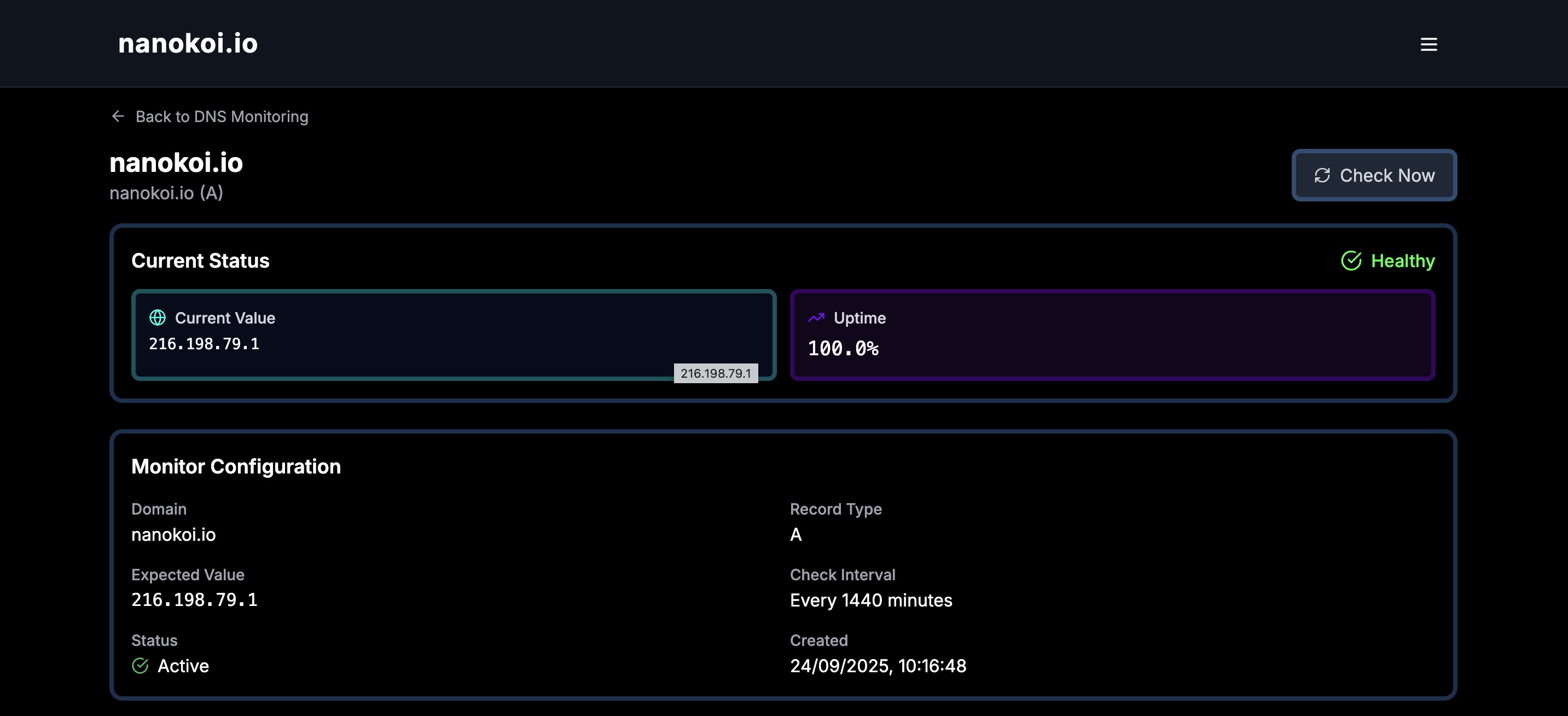
nanokoi monitors DNS records alongside uptime and SSL certificates, so you can see whether a problem started in DNS, on the server or at the certificate. See how DNS monitoring works in nanokoi.
- Supports A, AAAA, CNAME, MX, NS, TXT and SRV records
- Alerts by email, Slack or webhook
- Data export as CSV, JSON or XML, plus a REST API on paid plans
- Free plan for up to 5 URLs with no credit card required (compare plans)
DNS monitoring FAQ
What is DNS monitoring?
DNS monitoring regularly queries your domain's DNS records to confirm that they resolve and contain the expected values, and alerts you when they fail or change.
Which DNS records should I monitor?
Start with the NS records for your domain, A and AAAA records for your website, and MX and TXT records for email. Add CNAME and SRV records for the subdomains and services that depend on them.
How is DNS monitoring different from uptime monitoring?
Uptime monitoring checks whether a URL responds. DNS monitoring checks the step before that: whether the name resolves correctly. A site can fail because of DNS while the server is fine, so the two work best together. Our website monitoring guide explains how they fit together.
Why do DNS changes take time to show up?
Resolvers cache DNS answers for the record's TTL (time to live). Until the cached copy expires, some users keep receiving the old value, which is why lowering the TTL before a planned change helps.
Can DNS monitoring detect DNS hijacking?
It can detect the symptoms. If a record suddenly points to an unfamiliar IP address or name server, a monitor that tracks record values flags the change so you can investigate quickly.
Get started with DNS monitoring
DNS sits in front of everything you run online. Monitoring it closes a gap that uptime checks alone leave open, and it takes only minutes to set up.
Start monitoring your DNS records
Monitor A, AAAA, CNAME, MX, NS, TXT and SRV records with Nanokoi, together with uptime and SSL checks. The Free plan needs no credit card.